Blended Terrain Height Colours in Shader Graph
12th November 2020
UnityShader Graph
When building procedural islands I needed a way of setting the colours of a terrain mesh with URP in Shader Graph, and I wanted to be able to
blend between colours with a variable blend amount for each colour boundary. To avoid a horrific web of nodes
I needed to use a Custom Function Node.
 I’d supply the function with the Y position value as well as the highest and lowest heights on the mesh, allowing
me to get the pixel’s height as a value between 0 and 1. Each colour region would have a start height, colour and
blend amount (also between 0 and 1). The blend amount controls at what height the colour starts and stops interpolation
between the previous colour and the next.
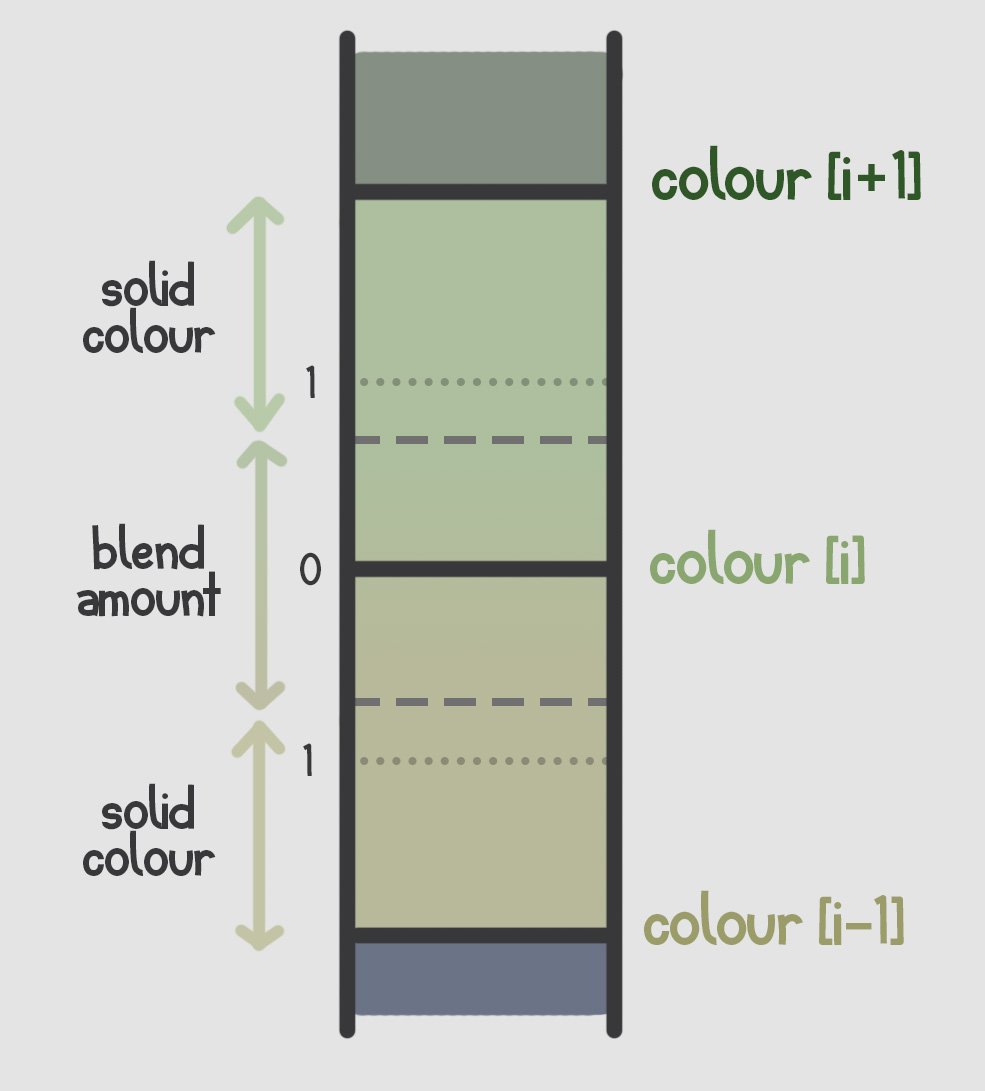
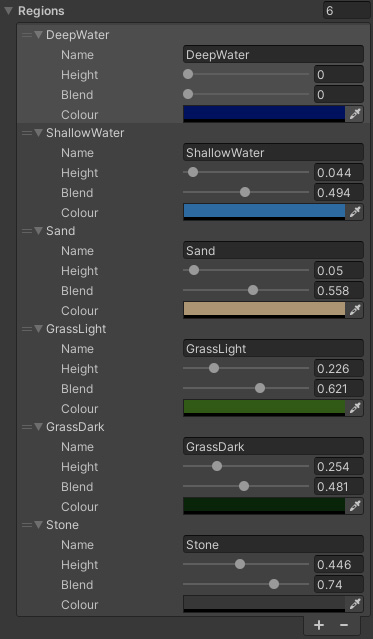 The custom function takes these input values and stores them in arrays to be iterated over, and checks the y position against the
height regions and either interpolates the colour if it lies within the blend area or returns the solid colour.
As Shader Graph doesn't support properties as arrays, values for each colour region need to be supplied individually
Blend amounts go from 0 (no blending) to 1 (starting blending at halfway to previous colour and finish at halfway to next colour)
                    // Returns the percentage of value between a and b
                    float inverseLerp(float a, float b, float value) {
                        // Saturate clamps the value between 0 and 1 (incase value is outside the range of a - b)
                        return saturate((value - a) / (b - a));
                    }

                    // Shader graph doesn't support arrays so parameters must be specified individually
                    void GetColourFromHeight_float(float posY, float minHeight, float maxHeight,
                            float4 colour1, float4 colour2, float4 colour3, float4 colour4, float4 colour5, float4 colour6,
                            float height1, float height2, float height3, float height4, float height5, float height6,
                            float blend1, float blend2, float blend3, float blend4, float blend5, float blend6,
                            out float4 colourOut) {

                        float height = inverseLerp(minHeight, maxHeight, posY);

                        // Store values in arrays so they can be access by index
                        float4 colours[] = { colour1, colour2, colour3, colour4, colour5, colour6 };
                        float heights[] = { height1, height2, height3, height4, height5, height6 };
                        float blends[] = { blend1, blend2, blend3, blend4, blend5, blend6 };

                        int regionCount = 6;

                        // For each colour region set the colour, interpolate if the pixel lies within the blend area
                        for(int i = 0; i < regionCount; i++) {
                            // Make sure next and previous heights don't go beyond limits of array
                            float heightPrev = 0, heightNext = 1;
                            if(i > 0) heightPrev = heights[i - 1];
                            if(i < regionCount - 1) heightNext = heights[i + 1];

                            float4 colourPrev = colour1;
                            if(i > 0) colourPrev = colours[i - 1];

                            float distNext = heightNext - heights[i];
                            float distPrev = heights[i] - heightPrev;

                            // Check height is within limits of current region
                            if(height >= heights[i] - distPrev / 2 && height <= heights[i] + distNext / 2) {
                                if(height <= heights[i] - distPrev / 2 * blends[i]) {
                                    colourOut = colourPrev;
                                } else if(height >= heights[i] - distPrev / 2 * blends[i] && height <= heights[i] + distNext / 2 * blends[i]) {
                                    // If height is within limits of blend amount, interpolate between current and previous colour
                                    colourOut = lerp(colourPrev, colours[i], inverseLerp(heights[i] - distPrev / 2 * blends[i], heights[i] + distPrev / 2 * blends[i], height));
                                } else {
                                    colourOut = colours[i];
                                }
                                break;
                            }

                            // If the colour isn't within the limits of any region (and doesn't break the loop
                            // then it will default to the last colour (to make sure the top of the terrain is completely coloured)
                            colourOut = colours[i];
                        }
                    }
The final result